
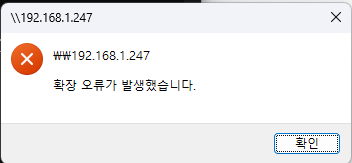
windows 24H2에서 SMB 접속시 확장 오류가 발생했습니다.(공유 안됨)
페이지 정보

본문
시스템이 Windows 11 24H2 버전인 경우 SMB 서명으로 인해 문제가 발생한 것으로 의심됩니다. 관리자 권한으로 PowerShell을 열고 다음 명령을 실행하여 SMB 서명을 비활성화하고 컴퓨터를 다시 시작하여 문제를 해결할 수 있는지 확인하는 것이 좋습니다.
Set-SmbClientConfiguration -RequireSecuritySignature $false
Set-SmbServerConfiguration -RequireSecuritySignature $false
첨부파일
-
gpedit-Setup.bat (379byte)
563회 다운로드 | DATE : 2025-03-26 14:37:48
- 이전글WINDOWS DNS SERVER BACKUP & RESTORE 25.05.22
- 다음글outlook 메일 깨짐 현상 25.01.10
댓글목록
등록된 댓글이 없습니다.